


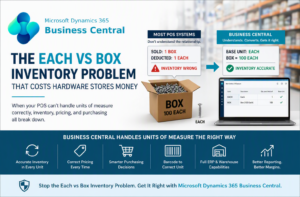
Each vs Box Inventory Problem in Hardware Stores
The “each vs box” inventory problem is one of the most common causes of inventory errors, pricing mistakes, and POS confusion in hardware stores.
This issue happens when an item is purchased in one unit (such as a box) but sold in another unit (such as each), and the system does not properly understand the relationship between them.
While this seems like a small detail, it creates major downstream problems across inventory, purchasing, pricing, and reporting.
What Is the Each vs Box Inventory Problem?
The each vs box inventory problem occurs when an item exists in multiple units of measure, but the system treats those units as if they were the same.
- A supplier sells a box of 100 screws
- The store stocks inventory by each
- The customer buys one full box
- The system deducts only 1 each instead of 100
Why This Happens in POS Systems
Most point-of-sale systems are built for simple retail environments where one item equals one unit. That design assumption breaks in hardware stores.
- POS systems assume fixed units
- They prioritize checkout, not inventory structure
- They do not fully support unit conversions
This is why these problems show up consistently in solutions compared in our hardware store POS system comparison.
Real-World Impact on Inventory and Purchasing
Once unit relationships are incorrect, the impact spreads quickly:
- Inventory counts no longer reflect reality
- Reorder quantities become unreliable
- Purchasing staff may overbuy or underbuy stock
- Cycle counts take longer and produce inconsistent results
Over time, this forces staff to manually adjust inventory or create workarounds, which further reduces confidence in the system.
Real-World Example
Let’s say you receive:
- 1 Box of screws (100 each)
But your POS treats it as:
- 1 unit instead of 100
Your system now shows:
- 99 units remaining after selling a box
In reality, inventory is zero. This mismatch compounds over time and affects every report that depends on quantity accuracy.
Why This Is an ERP Problem — Not Just POS
In a real hardware or building supply business, a single item can exist in multiple units at once:
- Purchased by the box
- Stocked by each
- Sold as each or box depending on the customer
Handling this correctly requires structured unit relationships and conversion logic. See how units of measure work within ERP systems .
How Business Central Solves Each vs Box
Microsoft Dynamics 365 Business Central is designed to manage these scenarios as part of its core data model.
- Base Unit (inventory control unit)
- Purchase Unit (supplier packaging)
- Sales Unit (customer-facing unit)
- Conversion factor between all units
Microsoft documents that alternate units of measure and conversion quantities ensure accurate inventory across purchasing, sales, and inventory transactions. See official Microsoft documentation on units of measure in Business Central .
This structure ensures that selling a box always deducts the correct number of each units, keeping inventory accurate across the entire system.
How to Fix the Each vs Box Inventory Problem
Fixing this issue requires more than a POS setting — it requires a structured approach to inventory data.
- Define a clear base unit of measure
- Map all alternate units to that base unit
- Use a system that supports unit conversion across transactions
- Align purchasing, inventory, and sales processes
For a broader explanation of how units of measure affect hardware store systems, see our units of measure in hardware store POS systems guide.
Stop Inventory Errors Before They Spread
If your system cannot handle each vs box correctly, it will create inventory inaccuracies, pricing errors, and poor purchasing decisions.
Business Central provides the structure needed to fix these issues at the root.
Learn how Business Central fixes this