


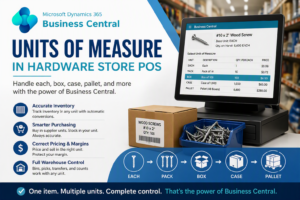
Units of Measure in Hardware Store POS Systems
Units of measure in hardware store POS systems are one of the most common causes of inventory errors, pricing issues, and purchasing mistakes.
Most POS systems were designed for simple retail: one item, one quantity, one price. That model breaks down quickly in hardware stores, lumberyards, and building supply businesses.
Real-world hardware inventory does not behave that way. The same product may be purchased in boxes, stocked as each, sold individually or in packs, priced differently by unit, and reordered based on supplier packaging.
This is exactly where most POS systems fail. They handle checkout, but they do not manage how units of measure affect purchasing, inventory, supplier data, and reporting.
Microsoft Dynamics 365 Business Central approaches this differently. It treats units of measure as part of the full ERP system — not just a POS setting.
See the bigger picture in our hardware store POS system comparison.
Quick Reality Check
If you have ever had:
- Inventory that doesn’t match the shelf
- Each vs box confusion at the register
- Incorrect margins
- Purchasing errors due to pack sizes
You don’t have a POS problem.
You have a Units of Measure problem.
And it gets worse when supplier data flows in from systems like Orgill POS Integration.
Units of Measure in Hardware Store POS Systems Explained
Units of measure in hardware store POS systems define how items are bought, received, stocked, sold, and counted. In simple retail, these are usually the same unit. In hardware, they are not.
An item may be purchased by the box, stocked as each, sold by pack, and tracked in yet another unit internally. If the system does not handle these relationships correctly, inventory, pricing, and reporting become unreliable. This is classic Each vs Box inventory problem.
What Is a Unit of Measure in Hardware Store POS?
A unit of measure defines how an item is quantified.
- Each
- Box
- Case
- Pallet
- Linear Foot
- Board Foot
Most POS systems struggle with this level of complexity, as shown in our POS comparison breakdown.
The Real Units of Measure Problem: Each vs Box
Example:
- Supplier sells a box of 100 screws
- Store tracks inventory by each
- Customer buys either each or box
If the POS does not understand this, inventory and pricing break immediately.
How Business Central Solves Units of Measure Problems
Business Central solves this structurally by separating:
- Base Unit of Measure (inventory)
- Purchase Unit (supplier)
- Sales Unit (customer)
- Conversion relationships
Microsoft documents that Business Central allows you to define a base unit of measure for inventory control, assign alternate units for purchasing and sales, and configure quantity-per-unit conversions to maintain accuracy across transactions. See official Microsoft documentation on units of measure in Business Central for details or visit the Microsoft Dynamics 365 Business Central Community to further understand units of measure in Business Central.
This is why Business Central ERP handles hardware complexity far better than POS-only systems.
Lumber Example
Lumber demonstrates the problem clearly:
- Sold by piece
- Measured by linear foot
- Calculated by board feet
This type of inventory cannot be handled cleanly by most POS systems, which is why many hardware retailers move to ERP-based solutions like Microsoft Dynamics 365 Business Central.
Business Central vs Generic POS for Units of Measure
When comparing units of measure in hardware store POS systems, the key question is whether the system can carry units through inventory, purchasing, and reporting — not just display them.
| Capability | Generic POS | Hardware POS | Business Central |
|---|---|---|---|
| Multiple UOM per item | ⚠️ Limited | ✅ Basic | ✅ Full ERP |
| Purchase vs Sales Units | ❌ | ⚠️ Varies | ✅ Native |
| Supplier integration | ⚠️ Limited | ✅ Partial | ✅ Full |
| Warehouse inventory tracking | ❌ | ⚠️ Limited | ✅ Full |
The Warehouse Advantage
Business Central includes true warehouse functionality:
- Bins
- Receiving
- Picking
- Inventory movement
This matches supplier complexity — especially systems like Orgill.
Why Most POS Systems Fail
- Focused only on checkout
- No full inventory structure
- No supplier-level data model
In real-world systems, items are often purchased, stored, and sold in completely different units. This is why ERP systems must support unit conversions across purchasing, inventory, and sales workflows. See how units of measure work within ERP systems for a broader explanation.
That’s why many dealers move to Business Central.
The slogan AI-First is meaningless when a system does not have a full inventory structure for any type of Items. AI is only effective when built on complete ERP data fields and workflows. See our Business Central vs Epicor AI comparison for a full breakdown.
FAQ: Units of Measure in Hardware Store POS
What are units of measure in hardware store POS systems?
They define how items are bought, sold, and tracked — including each, box, case, and more.
Why do units of measure cause inventory problems?
Because purchasing, stocking, and selling often use different units.
Can Business Central handle each vs box?
Yes, using built-in conversion logic.
Where can I compare POS systems?
See our POS comparison page.
Fix Units of Measure. Fix Your System.
If your store struggles with inventory accuracy, pricing, or supplier data — it’s time to move beyond POS.